
(301) 900-6114 support@pattrac.info

support@pattrac.info

This lesson describes how to assign a patient to a group.

Assigning the Group

Assigning the Group;1. Click the Clinic Groups menu item in the left Navigation Panel
            2. Locate the Group in the list and double-click to open.
1. Click the Clinic Groups menu item in the left Navigation Panel

2. Locate the Group in the list and double-click to open.

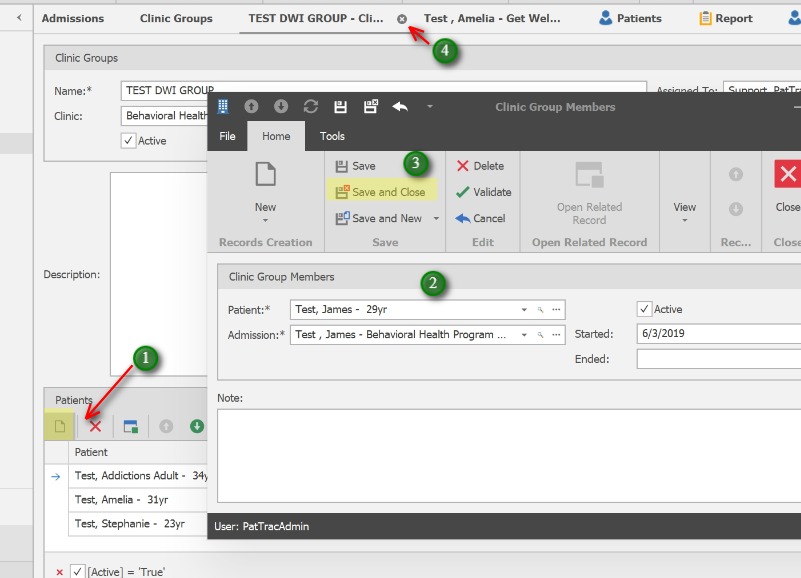
;1. To add a new member, click the New icon in the Patients list.
            2. Use the Search to locate the Patient.  Select the appropriate Admission. Enter the Start Date.  Use the Notes to add any notes specific to the patient's group membership.
            3. Save and Close to exit. (Use Save & New to add additional members to the group)
            4. When finished, Save & Close to exit the Group screen, or simply close the tab.

1. To add a new member, click the New icon in the Patients list.

2. Use the Search to locate the Patient.  Select the appropriate Admission. Enter the Start Date.  Use the Notes to add any notes specific to the patient’s group membership.

3. Save and Close to exit. (Use Save & New to add additional members to the group)

4. When finished, Save & Close to exit the Group screen, or simply close the tab.